How to book Gojek transport with Multiselect feature
How to book Gojek transport with Multiselect feature
Now, booking Gojek transport is more flexible with the multiselect feature. This feature allows you to choose multiple service options at once when booking the service.
For example, if you are in a hurry or need a quick ride, you can choose several types of two-wheeled or four-wheeled services in one booking. So, your chances of getting a driver are even greater!
Here are the stepsto the book:
Select GoCar/GoRide on Gojek homepage
Enter your destination and pickup location
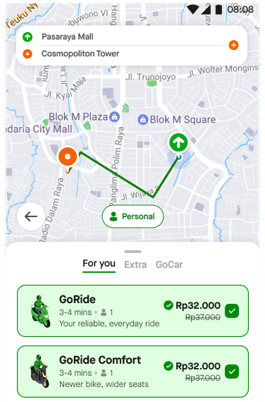
On the booking page, you will see transport service options available
Tick (✔️) on the service you choose. You can choose more than one service.
Continue the booking process
Gojek system will find a driver. The service that gets the driver the fastest will pick you up and drop you off.